First things first, What is Blogging?According to Blogger.com :
"A
blog is a personal diary. A daily pulpit. A collaborative space. A
political soapbox. A breaking-news outlet. A collection of links. Your
own private thoughts. Memos to the world."
Blogging in its simplest term is like :
An
online journal but much, much more powerful. Blogs (short for Web log)
is a place where surfers can get up to the minute information on a topic
or voyeur into someone's life. Some blogs are nothing more than a daily
glimpse into someone's life, while others are so sophisticated, it's
hard to tell them apart from an online news service.
Why Blog?Blogs,
the homepages of the 21st Century, are free and easy to set up and use.
They are popular with people who want to share thoughts online. They
allow for the instant publication of ideas and for interactive
conversations, through comments, with friends or strangers.
Blog
users are as varied as the types of blogs available. The so called
personal blogger write a blog to express what he feels about himself, or
about a certain subject matter that is of interest to him. Some blogs
are committed to a precise topic, like computer hardware or politics.
These are frequently read like magazines. While some others write Blogs
to make Money!
Have a look around!Its always a good idea to explore some blogs before you create your own. By the way, you are already inside one! [
MoneyBlogger.blogspot.com]
Take
a look at the layout, The sidebar, How the google Adsense Ads are
placed,Previous posts, other links etc etc. Given below are links to
some blogs by others which i had selected randomly. Take time to observe
those and get a feel of blogging and
COME BACK!http://paperforest.blogspot.com/ -
Art News and Ideas
http://www.boingboing.net/ -
One of the most popular blog
OK...Thats enough of theory and observation...Lets get to topic selection.
1. Topic SelectionYou
can start a blog on anything under the Sun - from your daily activities
to reviews about products, to discussion of ideas, to news about a
person, to stories, photos, jokes and poetry. But, If you want to make
money out of your blog, your topic must be useful to others. Only then
they will come to your blog site and read your blogs.
Deciding on
the topic and the content is the most difficult part of the blogging
venture. Some of the key factors in deciding the topic are:
(1) You know the topic
(2) You like the topic
(3) There is an audience for the topic
(4) The topic has a business value
(5) You can supply new content or add value to existing content
(6) Your topic is not a dead end topic; you can keep the content fresh
(7) You can build a community with the topic
[Source :
www.Seekluck.com]
Note :
From
here onwards, I'm going to be more specific. I will show you, how to
create a blog account on Blogger.com; How to add Contextual
Advertisements to your blog using Google AdSense to earn money; How to
add Sitemeter to know traffic statistics to your blog; How to submit
your blog to Search Engines; adding other tools to enhance your blog and
much much more!
Creating ur BlogSite in Blogger.comYou can setup a blog hosting account in 3 easy steps :
1.Create an accountUsername :
Password :
Display name : (The name used to sign your blog posts. )
(By this one account, you can add more than one blogsite)
2.Name your blog
Blog title (Enter a title for your blog.) Example : My Online Journal
Blog address ( URL ) : yourblogname.blogspot.com
3.Choose a template
Choose
a custom look for your blog. (You can easily change the template later,
or even create your own custom template design once your blog is set
up.)
You have successfully created ur blogsite!
Next
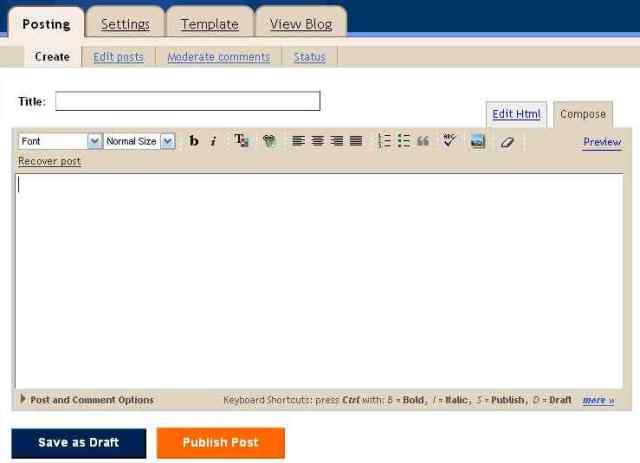
you will be taken to the composing page. You can compose a blog post
just easily as you compose an email. Here is a snapshot of the composing
page :

Paste your content, do the necessary enhancements and when you are done,
Click Publish Post button. Thats it!
To
view your Blog, click the 'View Blog' tab. You easily make changes to
ur current post or you can add new post to your blogsite.(There are some
Settings Changes that you want to make to get maximum of your blog, but
i will tell that in detail, Later.)
Congrats!!! for becoming a member of the Blogosphere, the name given to the Universe of weblogs.
Take
time to add more pages(blog posts) to your blogsite for the next few
days. If you think that you have enough content and links, its time to
TELL UR FRIENDS -
first step to promoting your Blog. Thats also the time to add some Contextual Advertisements...
We will discuss that in the next post!
Add AdSense, Make Money!
Now that you have created your
blog, its time to add Google AdSense to your blog to start making money.
But before that, here is quick recap of what we have done so far in
creating your free blog.
1. Select a topic
2. Setup a blog hosting account
3. Write posts
4. Tell Friends
Note: If you are new Visitor, and want to know how to create your free blog, Please check the Sidebar or Click here
Add AdSense, Make Money!
Blogger
provides a simple way for you to make money with your blog. AdSense is
Google's content-targeted advertising program. This means that you do
not select keywords or categories for your ads. Instead, Google's
servers determine what your posts are about and display the most
relevant ads to your readers. So, if you blog about baseball, there
might be ads for Major League Baseball memorabilia next to your post. If
you blog about painting, there might be ads for art supplies.
[source :
Blogger.com]
Putting Google AdSense on Your BlogYou can place AdSense on your (blogspot) blog quickly and easily. Follow these steps:
1. Sign-In to your blogger.com account
2. Go to the Template tab and you'll see an "AdSense ads" tab below it:

3.If
you don't have an AdSense account already, you can sign up for it right
here within Blogger. Just enter a valid email address, choose a
password, fill in some contact information (so you can get paid!) and
then Blogger will register your account for you right away. If you do
have an account already, just use the "sign in" link instead.

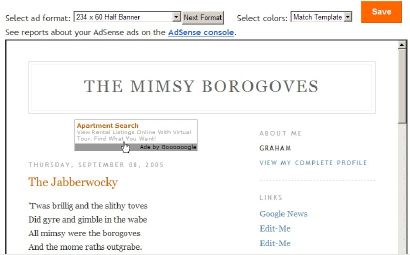
Once
you've completed the sign-up form, or logged in to an existing account,
you'll see a special preview version of your template, showing your
blog as it will look with your new ads:

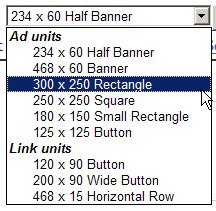
4.
Using the menus above the preview, you can easily change the size,
shape, and color of your ads, without ever needing to edit the code
directly. The color menu has some preset color schemes, but also some
flexible options that try to match, contrast, or blend with whatever
template you happen to be using. Try them all out and see which setting
works best.


5. Once you've decided how you'd like it to look, just save the changes and republish your blog. Then go check your email.
While
you were deciding on layouts and colors, you probably received a
confirmation email from AdSense. Find that email and click on the link
it gives you to confirm your email address. Be sure to read the rest of
the confirmation email as well, since it will contain other information
on finishing the registration and approval process.
Note :Until
your email address is confirmed and your AdSense application is
approved, your ads will only show public service announcements (PSAs)
rather than targeted ads. Since you don't get revenue from PSAs, you'll
want to be sure to do this soon, so the AdSense bot can crawl your site
and determine appropriate ads to show.
And now you're done! Congratulations -- you've got AdSense!
To
take full advantage of other AdSense options and settings, you can sign
in to the AdSense site and have a look around. That's where you can see
how much money your ads are earning and all that good stuff.


.png)